DepositFix Stripe Test Account
When you first sign up to DepositFix, you can skip connecting your Stripe account and use our test Stripe account for testing. This is very useful if you want to get set up and test quickly or don’t have a payment gateway yet.
To skip connecting Stripe, click on Skip this step.
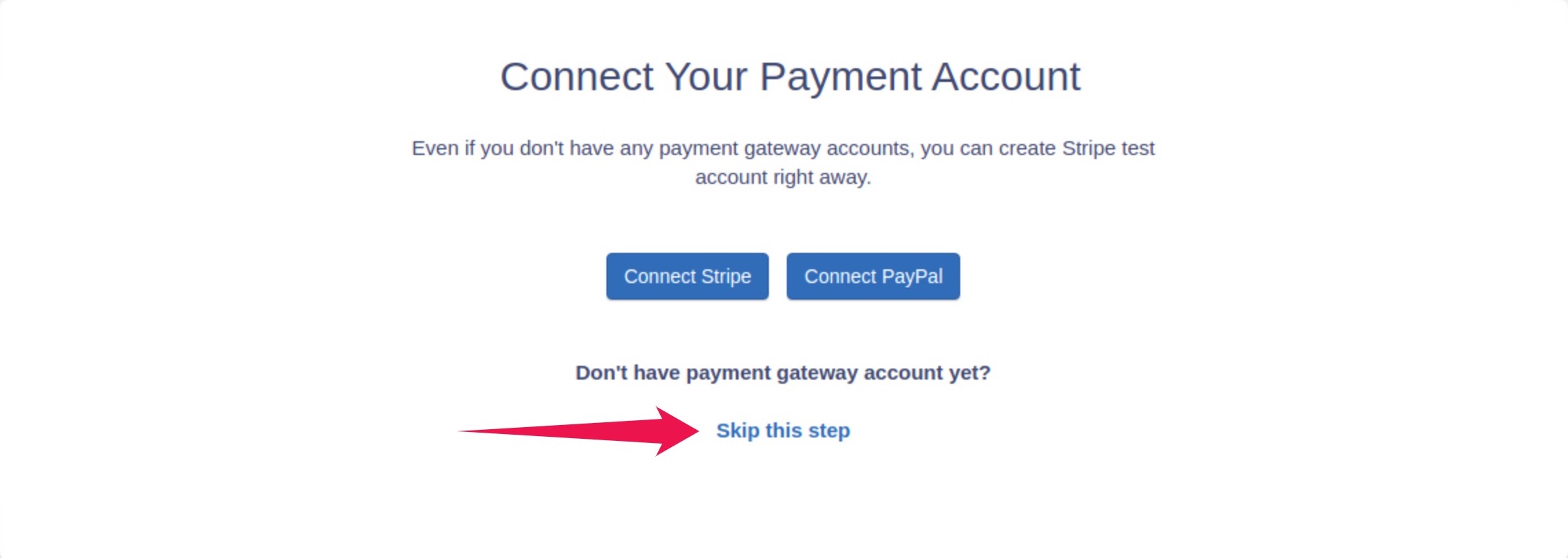
When using our default Stripe test account, you’re able to:
- Immediately create payment forms.
- Test these payment forms and all Stripes functionality.
- Switch to your own Stripe account and start collecting live payments immediately.
**
It is important to note that when using our default Stripe test account, you will not be able to access the Stripe account itself; instead, you can check your payments and transactions inside the DepositFix app or inside HubSpot itself.**
Testing your forms using the DepositFix default Stripe
You can use this test account to test the following features on your forms:
- Single Payment forms.
- Donation Payment forms.
- Subscription payment forms
- Discount codes and coupons.
When using subscription products, you can use one of the following plans:
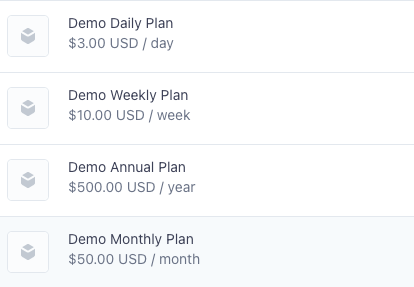
When using discount codes with Subscription products, you can use one of the following codes:
demo_50_percent- 50% offdemo_30_flat- $30 offdemo_annual_10_percent- 10% off (annual plan only).
You can test payments using the following Stripe testing cards:
Cards for Successful Payments
Expiration Date – any future date CVC – any 3 or 4 (AMEX) digits
- 4242424242424242 – Visa
- 5555555555554444 – Mastercard
- 378282246310005 – American Express
- 6011111111111117 – Discover
- 30569309025904 – Diners Club
- 3530111333300000 – JCB
Cards for Failed Payments
- 4000000000000101 – Failed CVC check
- 4000000000000119 – Charge is declined with a processing_error code
- 4000000000000069 – Charge is declined with an expired_card code